Modules
Deploy one layer, or all of them
Novalysis is built in layers. Each one is a module you can deploy on its own, or together for a full migration.
| Module | What it covers |
|---|---|
| Project Management | Waves, tasks, risks and communications in one plan, built from the layers below |
| Power Platform | Power Apps, Power BI and flows, and the sites, lists and mailboxes they depend on |
| SharePoint | Sites, sharing links and permissions, down to individual files and list items |
| Outlook | Mailboxes, shared mailboxes and delegation |
| Users and Groups | Users, security groups, distribution lists and Microsoft 365 groups, including stale accounts |
Plan
Discovery that stays current
Connect Novalysis to your Microsoft 365 tenant and it builds one record of your environment, kept up to date through Microsoft Graph with delta queries.
- Users and groups: users, security groups, distribution lists and Microsoft 365 groups
- Exchange mailboxes: user and shared mailboxes, sizes and delegation
- OneDrive accounts: personal storage across your organisation
- SharePoint sites: site collections, subsites, sharing links and permissions
- Teams: Teams, channels and membership
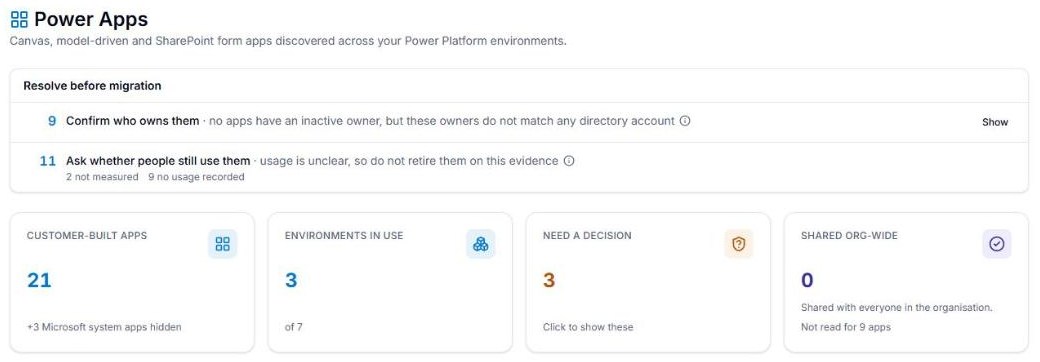
- Power Platform: Power Apps, Power BI and flows, linked to the sites, lists and files they use, how many people use them and who owns them. This needs a one-off registration by a Power Platform admin.
Waves built around teams
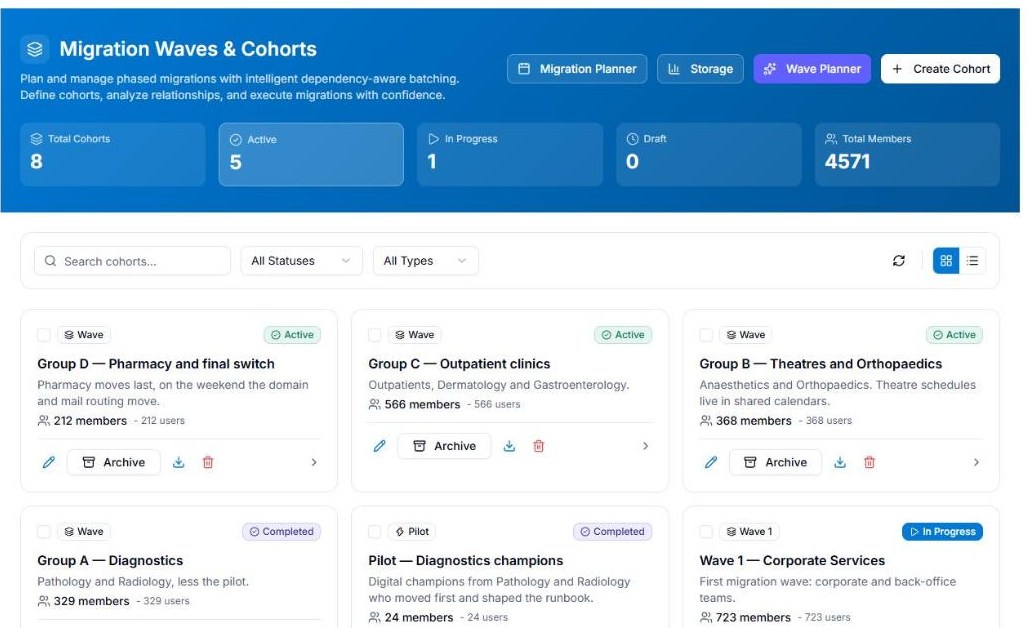
Discovery exports usually arrive one workload at a time, so plans end up split by object type. Novalysis plans waves around people instead.
- Keep a department, a Team, the people who share a mailbox or a site’s members together in one wave
- Run a dependency check on a wave to pull in the shared mailboxes, Teams and sites its people use
- See which Power Apps a wave will affect before it moves
Rules and a review queue
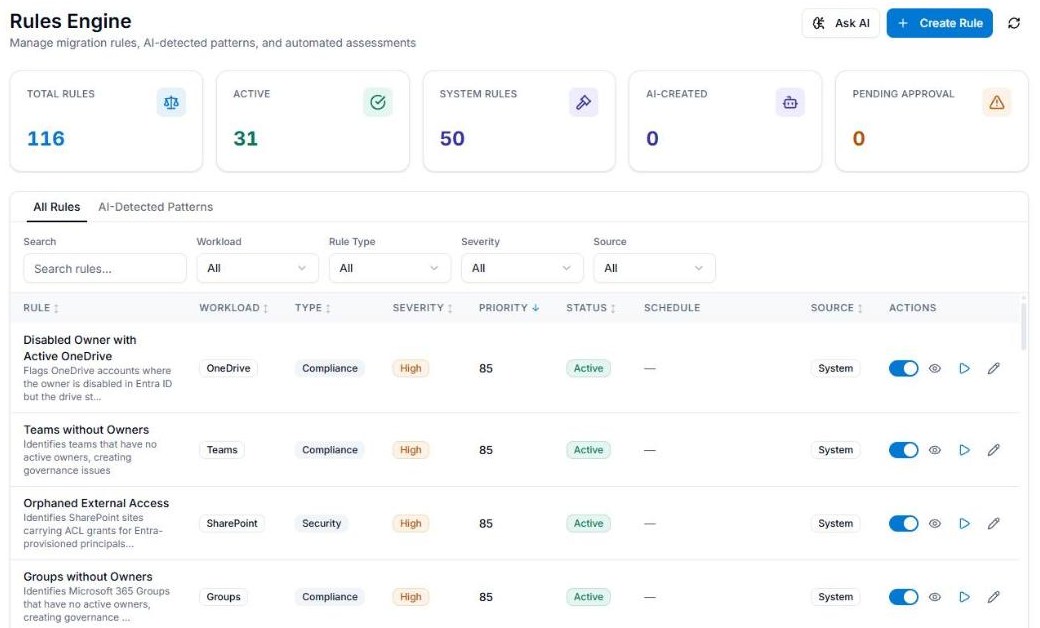
Rules start from templates, run on a schedule and send what they find to a review queue, so a person decides what stays behind.
- Inactive mailboxes, sites, Teams, groups, OneDrives and accounts
- Mailboxes too large to move as they are, or on litigation hold
- People with a desktop Office licence who haven’t opened a desktop Office app in six months, as candidates for a web-only licence
Task management
- Create tasks for departments, sites or groups of people, with owners and due dates
- Track progress from Not Started to Completed
- Link tasks to specific resources and communications
- Map your timeline with scheduled tasks and milestones
Destination verification
Before you migrate, check the destination tenant is ready: user account availability, group naming conventions, SharePoint URL availability, and conflicts that would cause problems on the day.
The assistant
Questions answered from the record
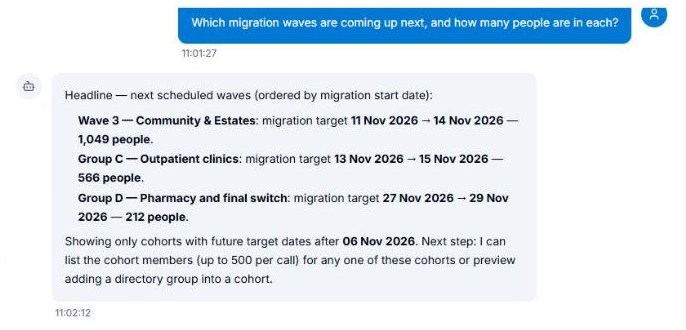
Most questions about a migration take several lookups. The assistant does them in order, shows the steps it took, and tells you what it found in plain English. It has specialists for data analysis, architecture and communications planning.
Proposes changes, a person approves them
The assistant can propose a change of scope or schedule an email from your templates. Each plan waits on an approval card for someone with the right role, and an approved change is recorded in the item’s scope history, with the assistant named and the reason it gave.
- Only uses the tools the asker’s role allows
- Runs on Azure OpenAI in your own subscription
Tell people
Campaigns that run for every wave
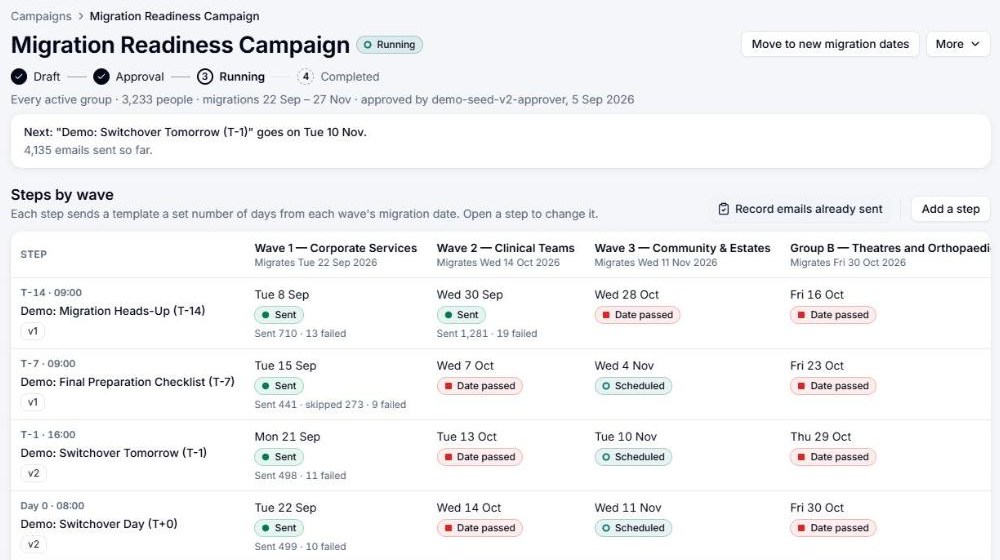
A campaign is a set of steps timed from the wave’s date: an announcement four weeks out, then two weeks to go, one week to go, the day itself and help on the first day. Every wave gets the same steps on its own dates, and when a wave moves, its emails move with it.
- Templates with a version history, ready-made for the usual migration messages
- Each person’s details filled in, such as their new address and their date
- Reading age and length checks against limits you set
- AI rewrites to make a draft shorter, more reassuring or less formal
- See who each step will reach, and require two different people to approve it
- Skip people who have already done what a step asks, such as activating their new account
- Sent from your own mailboxes, through your own Microsoft 365
Released to staff when it’s right
Each wave’s new account details reach the staff page only when someone releases them. You choose what the page lists, from a person’s own mailbox and OneDrive to the shared mailboxes, distribution lists, Teams and sites moving with them, and what isn’t moving. Preview the page as someone in the wave before you release it. A release can be withdrawn, and each one is kept in the release history.
A staff page in Microsoft Teams
Each person sees their own move: the date with a countdown, their new address, what’s moving with them, a short checklist and the emails they’ve been sent. It warns them if their mailbox is too large to move, and tells them when their date changes.
- Your own app in Microsoft Teams, with your name, logo and colours, and in a browser too
- You choose who can sign in: nobody yet, selected waves or Entra groups, or everyone
- A staff assistant answers questions from your FAQs and the person’s own move, so the service desk is left with the questions that need a person
Stakeholder messaging
Executives want progress and risk. IT champions want detail. Staff want to know what to do and when. The same migration data drives a message for each audience.
Prove it
Scope history on every item
Every change of scope records who made it (a person, the assistant, a rule, or “automatically because…”), when, why and where. The history is append-only and never purged, and it appears on each user, mailbox, OneDrive, group, Team, site, Power App and flow. Renames are kept the same way.
Each item carries a migration decision: In Scope, Out of Scope (with the reason recorded), Blocked or Pending Review.
Sign-off before anything moves
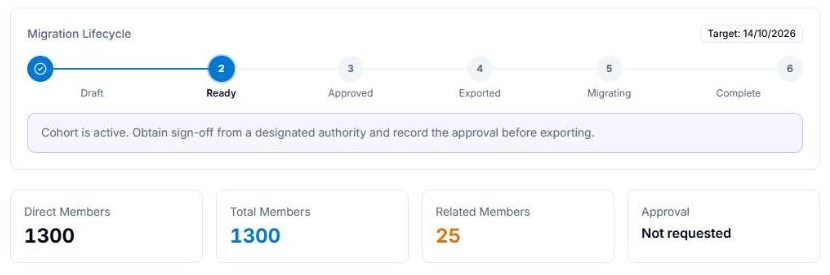
A wave can’t be exported until it’s signed off. The sign-off goes out by email and keeps a fixed snapshot of what was in scope and what was left out, each exclusion with its reason, with the approver’s name and title, their response and the date.
Decision log and meeting notes
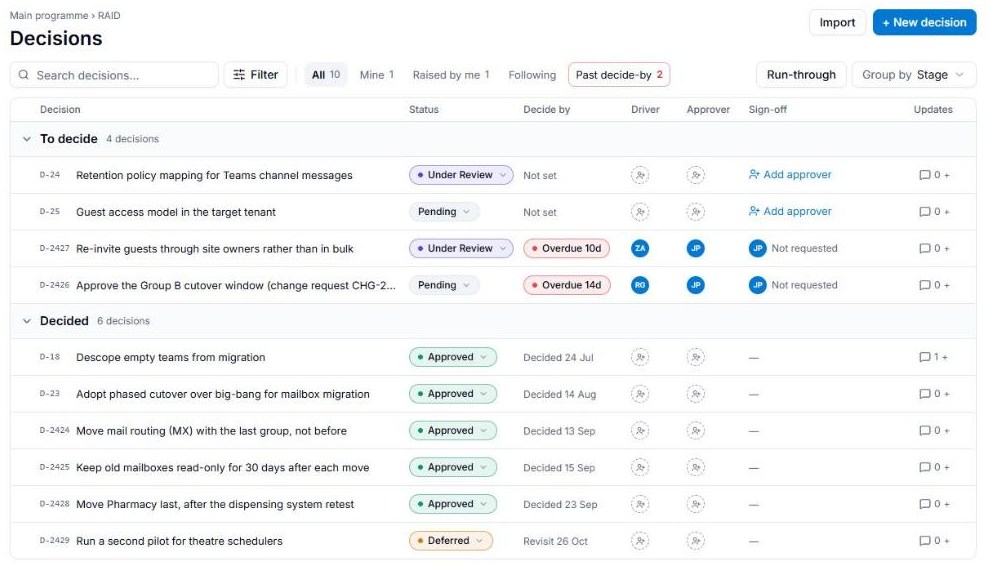
Project decisions go in the decision log, one of the RAID registers, with the options, the criteria, the rationale, the approver and a date to review it. Upload a meeting transcript and Novalysis proposes the tasks, decisions and risks in it for a reviewer to approve. The whole log can be exported.
All of it stays in your Azure subscription when the consultancy moves on, for as long as you keep Novalysis.
Beyond migration
Copilot readiness, site by site
Novalysis reads SharePoint permissions down to individual files and list items, keeps an inventory of sharing links, and shows who gets access by department. Where the same few people keep sharing files in one folder, it suggests a place of their own, such as a restricted library or a private team.
Each site gets a Copilot readiness score and a state, from Blocked to Enabled, and its owner gets a plan of what to fix. Causes that sit in tenant settings, such as the default sharing link, are listed separately, because fixing them site by site only lets them grow back. Novalysis reads and recommends. Your site owners and SharePoint admins make the fixes.
Any rollout staff have to act on
An MFA rollout, a new sign-in method, a device policy or Copilot reaching a department has the same shape as a migration: groups of people, a date for each, something each person has to do. Novalysis runs them with the same cohorts, campaigns, staff page and assistant.
SharePoint activity and dashboards
- Site visit patterns, last accessed dates and usage for clean-up decisions
- Migration progress, task completion, risks and issues at a glance
How it fits
Exports to the tool that does the moving
Novalysis plans the moves and leaves the copying of mail, sites and files to the migration tool you already use. Each signed-off wave exports as a ready-made file for Quest, ShareGate, BitTitan or CodeTwo, or as generic CSV or JSON for anything else, including account mappings between source and destination.
Room for your consultancy
Your migration partner can work inside your instance, with accounts you issue and can remove at any time. Nobody needs a copy of your tenant on their laptop.
Your own Azure subscription
Novalysis is installed from the Azure Marketplace as a managed application in your subscription. Read exactly what is stored where.