Novalysis
Plan your M365 migration with confidence
Novalysis plans Microsoft 365 migrations and rollouts around the people they affect. It maps what each team relies on, tells every member of staff what’s happening to them, and records who decided what, and why. It all runs in your own Azure subscription.
Modules
Start with one layer, or plan the lot.
Each layer is a module you can deploy on its own, for example to fix SharePoint sharing before Copilot, or together for a full migration.
Project Management
Waves, tasks, risks and communications in one plan, built from the layers below.
Power Platform
The apps and flows people rely on, and the sites and mailboxes behind them.
SharePoint
Sites, sharing links and permissions, down to individual files.
Outlook
Mailboxes, shared mailboxes and who works on whose behalf.
Users and Groups
Who exists, what they can reach, and which accounts nobody uses.
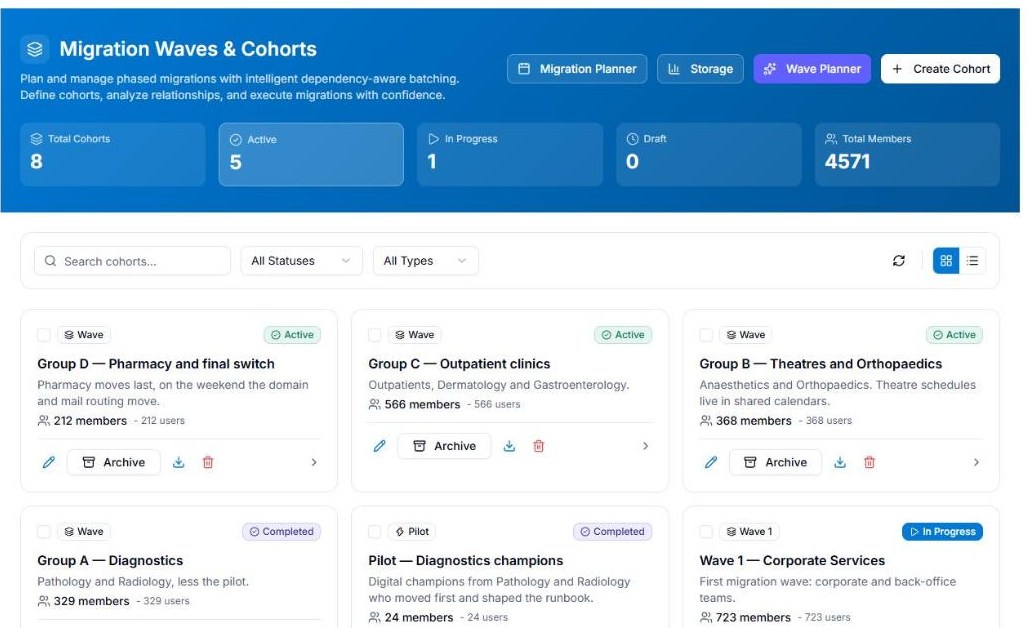
Discovery and waves
Plan waves around teams, not object types
Novalysis reads users, mailboxes, OneDrive, SharePoint, Teams, groups and Power Platform into one record, and keeps it current through automated synchronisation. Waves are built around departments and teams, and a dependency check shows what else a wave’s people use before it’s signed off.
- Continuous sync from Microsoft Graph API, with delta queries
- Power Apps and flows linked to the sites, lists and mailboxes they depend on
- Rules flag inactive accounts, oversized mailboxes and unused licences for review
- Signed-off waves export to Quest, ShareGate, BitTitan or CodeTwo
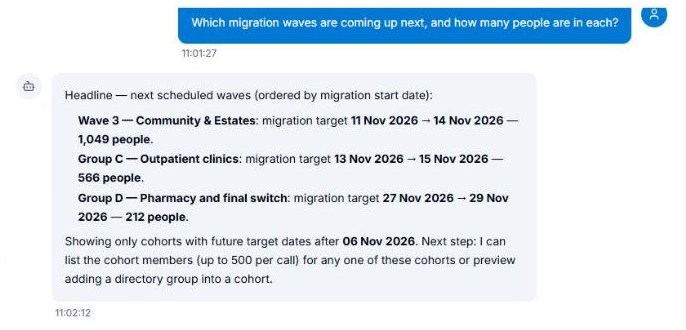
The assistant
An assistant that proposes, and a person who approves
Ask the record a question in plain English. The assistant does the lookups, shows the steps it took, and can propose a change of scope or schedule an email from your templates. Nothing happens until someone with the right role approves it.
- Specialists for data analysis, architecture and communications planning
- Only uses the tools the asker’s role allows
- Approved changes are recorded with the assistant named and its reason
- Runs on Azure OpenAI in your own subscription
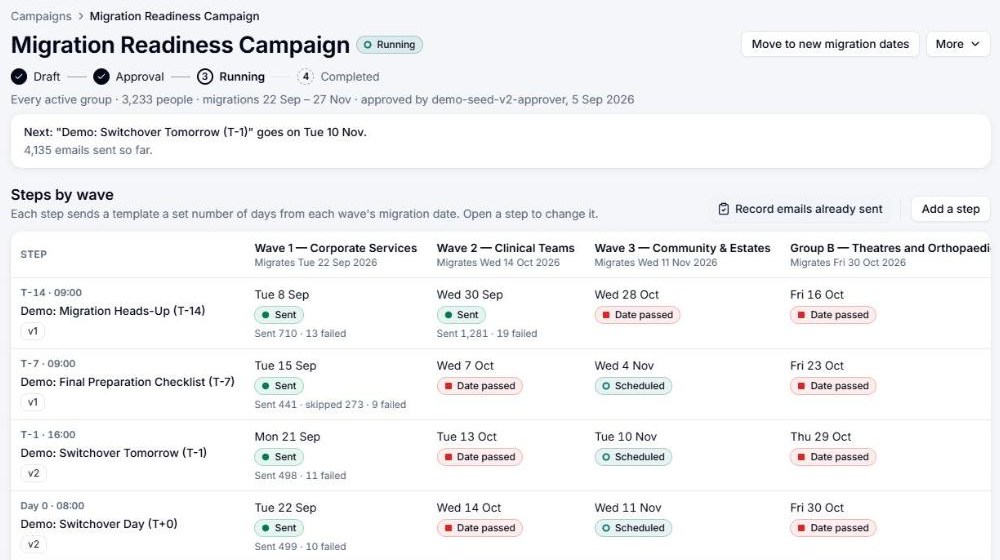
Communications
Every member of staff sees their own move
Set a campaign up once and it runs for every wave on that wave’s own dates. Each person gets a page in your own branded app in Microsoft Teams, with their move date, their new address, what’s moving with them and every email they’ve been sent.
- Campaign steps timed from each wave’s date, and moved when the wave moves
- Reading age and length checks, with two-person approval before sending
- Sent from your own mailboxes, through your own Microsoft 365
- A staff assistant that answers from your FAQs and the person’s own move
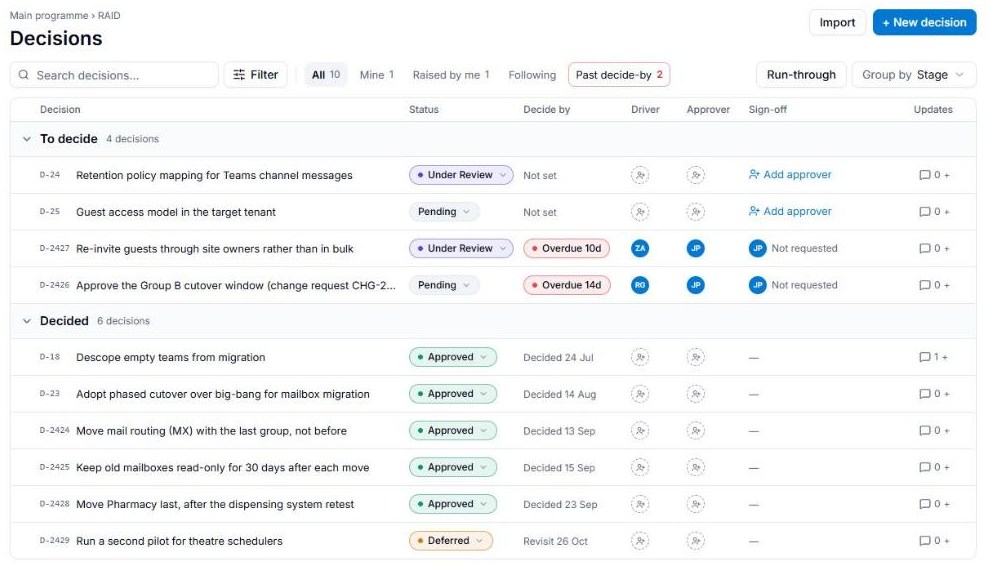
Decisions and sign-off
Every decision stays on the record
Every change of scope records who made it, when and why, on the page of the thing it’s about. A wave can’t be exported until it’s signed off, and the sign-off keeps a fixed snapshot of what moved, what was left out and the reason for each.
- Append-only scope history on every user, mailbox, site, Team, app and flow
- Emailed sign-off with the approver’s name, title, response and date
- A decision log with options, rationale and a review date
- The record stays in your subscription after the consultancy moves on
Where it runs
Deployed into your own Azure subscription
Novalysis is installed from the Azure Marketplace as a managed application. Your tenant data, plans and decisions are stored in your subscription, and people sign in with your organisation’s own Entra ID accounts.
- Azure SQL with Entra-only sign-in, Key Vault and Azure OpenAI in your subscription
- Roles for Admin, Analyst, Viewer, Comms and End User
- Consultants work inside your instance, with accounts you issue and can remove
- What does reach Glaicier is listed in full on the security page